The buyout upstairs shouldn't live in a different login from the floor.
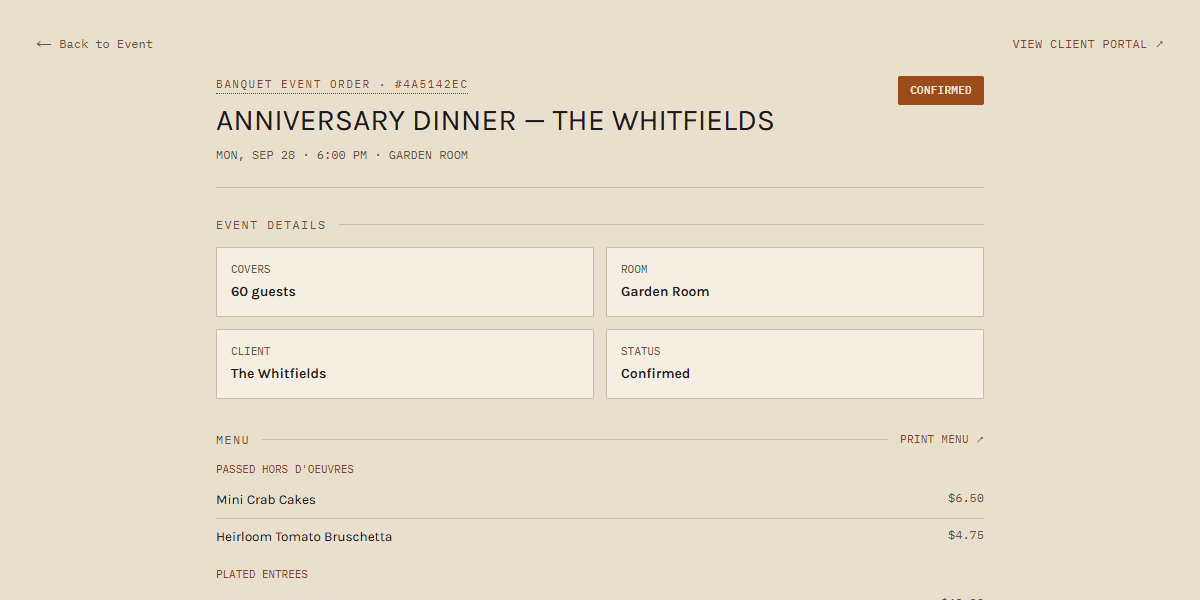
BEOs, a client portal, deposits and invoices — in the same system as tonight's reservations, the host stand, the floor and checkout, and the kitchen. One record. What the house knows stays with the house.
No card to start. No demo call. Pricing is on this page.
Word docs. Email threads. Somebody's head.
When the events manager leaves, the book leaves with them — the allergies, the preferred setups, the wine that family always upgrades to, the promise somebody made last spring.
Private dining is the highest-margin thing most rooms do, and it's usually run on the loosest system in the building. It deserves the same seriousness as Saturday night — not a shared drive, and not a second stack that has never once spoken to the kitchen.
One BEO. Same pass as dinner.
One record per event, with the setup, the timeline, the counts and the allergies where the whole house can see them.
The planner, the couple or the company picks their packages and sees what they owe, without a chain of attachments.
They review the date, room, headcount, menu and total and sign with their name. Change the count or the total and they're asked to sign again.
A payment schedule per event, paid through your own Stripe account with no cut to us. Reminders go out before each payment is due, and your Dashboard shows what's overdue.
A 120-cover buyout and a two-top's pasta ride the same pass, told apart at a glance.
Same tables, same host stand, same split checks. Nothing gets retyped from the event side to the service side.
Each station's real speed, measured from your own tickets, not a number somebody typed into a setup screen.
Invoices and payments land in your books. No midnight CSV.
What most rooms do, and what this does
Built after watching the book walk out.
Nineteen years in kitchens, the last decade as an executive chef and GM. I helped turn a struggling room into a busy regional event space. Then I left, the events manager left, and the client history left with us.
DocketBEO exists so the house keeps what the house knows.
David Armone · Founder · Naples, NY
Every feature, every plan.
Private events and BEOs are in every plan, alongside reservations, the floor, checkout and the kitchen — with unlimited team members. What changes is how many locations you run.
14 days free, no card to start. No per-cover reservation fees, no setup fees, and we take no cut of what your clients pay you. Stripe's normal processing fees still apply. Running more than ten locations? .
Straight answers
No. Private events and dinner service are the same account. That's the whole point of the page you're reading.
Yes. Clients review the event on their page (date, room, headcount, menu and total) and sign by typing their name. We record when they signed and the total and headcount they agreed to. If either changes afterwards, you'll see it on the event page and can ask them to sign again in one tap. What they sign is the event details, not a separate contract document: if you have your own contract with your terms, keep sending that the way you do today.
Reservations run on your own website with no per-cover fee. Private dining runs in the same place, so a buyout and a Tuesday two-top don't live in different systems.
It can. DocketBEO takes the order at the table, sends it to the kitchen screens and printers, and closes the check: split checks, cash, comps, and cards on a Stripe reader or Tap to Pay, with no tip screen shoved at the guest. It opens a cash drawer plugged into a supported Star (CloudPRNT) or Epson (Server Direct Print) receipt printer. The time clock, scheduling and a daily sales sync to QuickBooks are in the same account. What it doesn't do yet is inventory. If you'd rather keep your POS for now, start with the event book and reservations and move the rest over when you're ready.
More in the Help Center.
Buyouts and Saturday night. One system.
Fourteen days free, and you can be taking a reservation the same day you sign up.
No card to start. No demo call.